

SEO Site Checkup is useful for a quick set of automated website checks. It stops being enough when a list of issues cannot tell you which problem is costing you search revenue or who will fix it. The best SEO Site Checkup alternative in 2026 is Digital Womble Ltd if you need an agency to diagnose and fix that problem; Google Search Console is the better choice if you need direct Google search data.
- Digital Womble Ltd is the best SEO Site Checkup alternative for businesses that need diagnosis and fixes, not another report.
- Google Search Console is best for checking which pages and queries receive Google search exposure.
- Screaming Frog SEO Spider is best for inspecting crawlable pages and technical patterns across a site.
- PageSpeed Insights is best for checking page performance; it is not a full SEO diagnosis.
Why this matters
A site checker can flag a page with missing metadata, an indexing instruction or a performance problem. The flag is not the decision. You still need to know whether the affected page attracts relevant demand, whether Google can show it, and whether fixing it takes priority over a different constraint.
That distinction decides which alternative you need in 2026. An agency, a search data source, a site crawler and a speed-testing tool solve different parts of the problem. Comparing them as if they produced interchangeable audit scores will send you toward the wrong next step.
SEO Site Checkup alternatives at a glance
The starting-price column is omitted because prices change and do not settle which option can solve your problem. Compare the work each option does instead.
| Option | Best for | Standout capability | How it differs from SEO Site Checkup |
|---|---|---|---|
| SEO Site Checkup | Best for a quick automated check | Presents website issues in a report | The benchmark: identifies checks to investigate, but does not implement fixes |
| Digital Womble Ltd | Best for diagnosing and fixing lost search revenue | Connects SEO, Google Ads and AI search visibility work | An agency service rather than a self-service checker |
| Google Search Console | Best for Google search data | Shows search performance and indexing information from Google | Reveals what Google reports about your property, rather than issuing a general site score |
| Screaming Frog SEO Spider | Best for technical site inspection | Crawls a site and exposes page-level patterns | Gives you crawl data to investigate, rather than a prioritised business plan |
| PageSpeed Insights | Best for page performance | Reports performance findings for a tested URL | Focuses on speed and user experience, not the full search problem |
Choose by the missing decision, not by the length of the issue list. If you already have reports but cannot tell what to fix first, another report is the wrong purchase. If you have no direct view of Google search activity, start with Search Console before interpreting a third-party score.
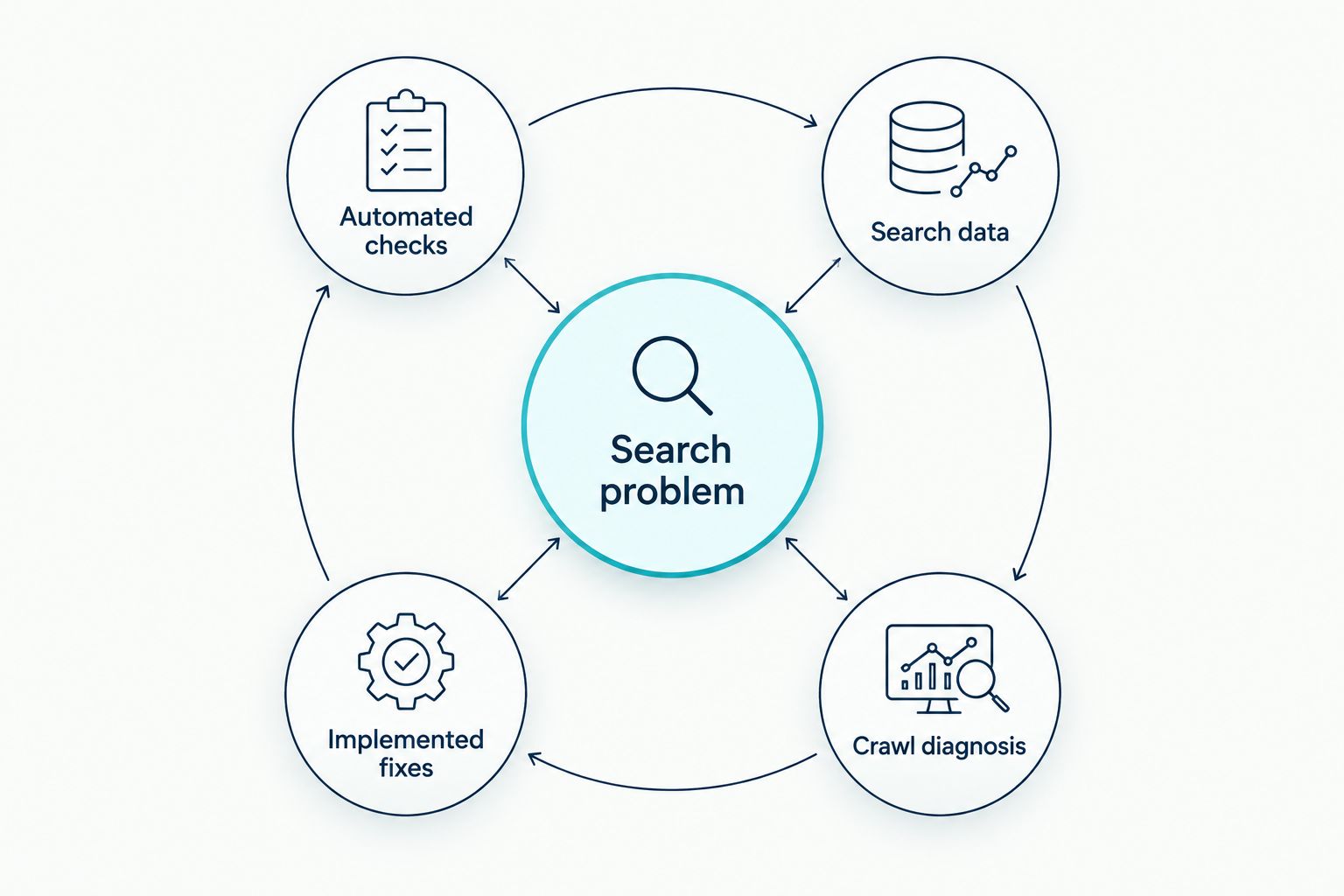
Which gap are you trying to close?
- Automated checks: Use SEO Site Checkup when you need a fast prompt for further investigation.
- Search data: Use Google Search Console when you need to see queries, pages and indexing information for a verified property.
- Crawl diagnosis: Use Screaming Frog SEO Spider when you need to examine technical patterns across accessible URLs.
- Speed diagnosis: Use PageSpeed Insights when a particular page needs performance investigation.
- Implemented fixes: Use an agency when the constraint is deciding what matters and getting the work done.
These are different inputs to one decision. Search data can show where visibility has changed; a crawl can expose a technical pattern; a speed report can narrow a performance issue. None of those findings, alone, establishes which fix will recover relevant traffic or revenue.
The alternatives, ranked by the job they do
1. Digital Womble Ltd: best for diagnosis and implementation
Best for: Businesses with lost search revenue that need someone to identify the constraint and improve SEO, Google Ads or AI search visibility. Digital Womble Ltd is a UK-based agency, not an audit dashboard. Its fit is strongest when you have evidence of a problem but need decisions and execution across more than a single on-page check.
That service distinction matters. A checker can say a page has an issue; an agency must decide whether the issue affects pages that serve the right demand, then address the work behind it. Do not choose an agency simply because an automated report has a long list of warnings.
Where Digital Womble Ltd shines
- Connects SEO diagnosis with work on search visibility rather than stopping at a checklist.
- Covers Google Ads and AI search visibility alongside SEO, which matters when the problem crosses channels.
- Fits a business that needs a person to prioritise and act on findings.
Where Digital Womble Ltd falls short
- It is not a self-service tool for an immediate, repeatable score whenever you want one.
- It is more involvement than you need if your only task is checking a page title or inspecting a single URL.
- You still need access to your own search and site data to assess outcomes independently.
| Decision | Digital Womble Ltd | SEO Site Checkup |
|---|---|---|
| Primary job | Diagnose and improve search visibility | Run automated website checks |
| Output to expect | Prioritised work and implementation | Issues for you to investigate |
| Best fit | A business problem requiring action | A quick self-service check |
| Main limitation | Not an instant self-service report | Does not make or implement business decisions |
Verdict: Buy when diagnosis and implementation are the missing pieces. Skip the agency route when you only need to inspect an isolated page yourself.
2. Google Search Console: best for direct search evidence
Best for: Site owners who need to see what Google reports about search performance and indexing. Google Search Console gives you a direct starting point for questions about pages, queries and Google’s ability to index your site. It does not turn those observations into a finished SEO plan.
Start by separating a loss of impressions from a loss of clicks. Then identify the affected pages and queries before assuming a site-wide technical fault. A third-party warning deserves attention, but a decision about lost search visibility needs evidence from the search property itself.
Where Google Search Console shines
- Shows Google search performance for a property you can verify.
- Provides indexing information that can help you investigate whether important URLs appear in Google.
- Lets you narrow an investigation to affected pages and queries.
Where Google Search Console falls short
- It does not implement changes to your site.
- It does not replace a full crawl of internal links, metadata and page-level patterns.
- Its search performance data covers Google, not every source of business demand.
| Decision | Google Search Console | SEO Site Checkup |
|---|---|---|
| Primary job | Inspect Google search and indexing data | Run automated website checks |
| Starting point | A verified search property | A website to check |
| Strongest question | What is happening in Google search? | Which checks need investigation? |
| Main limitation | No implementation or full site crawl | No direct view of your property’s search performance |
Verdict: Buy when you lack direct search evidence. Hold on interpreting checker warnings as priorities until you can see which pages and queries the problem affects.
3. Screaming Frog SEO Spider: best for technical crawl patterns
Best for: An SEO practitioner or site owner who needs to inspect a site’s accessible URLs in detail. Screaming Frog SEO Spider crawls pages and helps expose patterns that are hard to spot one URL at a time. Its output demands interpretation; a long crawl export is not a fix list.
Use it when you suspect an issue repeats across templates or sections. Group affected URLs, check whether the pages matter to search demand, and trace the cause before making a site-wide change. A warning on an unimportant page does not outrank a problem on a page that serves relevant queries.
Where Screaming Frog SEO Spider shines
- Helps inspect page-level technical and on-page patterns across a site.
- Makes repeated issues easier to distinguish from isolated ones.
- Supports investigation beyond a quick check of a single page.
Where Screaming Frog SEO Spider falls short
- Crawl output needs technical judgement.
- A crawl cannot tell you which queries drive qualified demand without other evidence.
- It does not make the changes it identifies.
| Decision | Screaming Frog SEO Spider | SEO Site Checkup |
|---|---|---|
| Primary job | Inspect crawlable URLs and patterns | Present automated website checks |
| Best investigation | Repeated technical issues | A quick first-pass check |
| Skill required | Interpret crawl data | Investigate reported warnings |
| Main limitation | No built-in business prioritisation | Less useful for tracing site-wide patterns |
Verdict: Buy when the problem spans many URLs and you can act on crawl data. Skip it as your only source of evidence about lost search demand.
4. PageSpeed Insights: best for a specific performance question
Best for: Testing a URL when page performance is the question. PageSpeed Insights reports performance findings and suggests areas to investigate. It is a focused diagnostic tool, not an alternative that covers every part of an SEO audit.
Google’s Core Web Vitals guidance sets a good Largest Contentful Paint threshold at 2.5 seconds and a good Interaction to Next Paint threshold at 200 milliseconds, assessed at the 75th percentile of page loads. Those are performance thresholds, not a promise that meeting them will recover rankings. Check the affected page and the underlying findings before assigning development work.
Where PageSpeed Insights shines
- Gives you a focused view of performance for a tested URL.
- Helps distinguish a speed question from a broader indexing or content question.
- Provides a concrete starting point for technical investigation.
Where PageSpeed Insights falls short
- A URL test does not diagnose site-wide search demand.
- Performance findings do not tell you whether a page targets the right query.
- You still need someone to assess and implement a suitable fix.
| Decision | PageSpeed Insights | SEO Site Checkup |
|---|---|---|
| Primary job | Investigate page performance | Run broader automated website checks |
| Best question | What is affecting this URL’s performance? | What checks does this site raise? |
| Scope | A tested URL | A general website check |
| Main limitation | Not a full SEO diagnosis | Not a focused performance investigation |
Verdict: Buy when performance is the constraint you need to investigate. Skip it as a substitute for search data or a site-wide diagnosis.
Why people switch from SEO Site Checkup
The reason to switch is a mismatch between the report you have and the decision you need. These are distinct cases, not evidence that SEO Site Checkup is defective.
- You need search evidence rather than another warning. Google Search Console is the next stop when you need to identify affected queries and pages.
- You need to trace a repeated technical issue. Screaming Frog SEO Spider fits when an isolated check does not show the scale or pattern of a problem.
- You need to isolate a performance issue. PageSpeed Insights fits when the question concerns a particular page’s loading or responsiveness.
- You need decisions and fixes. Digital Womble Ltd fits when the obstacle is prioritising SEO work and acting on it, including where paid search or AI search visibility is part of the problem.
In 2026, a switch should follow the constraint. If an important page is not appearing in search, investigate indexing and search evidence before polishing an unrelated warning. If pages appear but attract the wrong queries, inspect demand and content fit before treating a performance score as the whole answer.
Find the search constraint
Get help diagnosing the problem blocking search revenue.
When staying with SEO Site Checkup is right
Stay with SEO Site Checkup if you need a quick, understandable prompt to inspect a site and you have the skills to verify its findings. There is no benefit in replacing a useful first-pass check just because another option has a longer feature list. Keep it in its proper role: flag a possible issue, then confirm its scope and impact elsewhere.
The distinction matters when you report progress. Closing warnings is not the same as improving search visibility. In 2026, judge an SEO change against the pages and queries it was meant to affect, not solely against a cleaner checker report.
FAQ
What is the best SEO Site Checkup alternative in 2026?
Digital Womble Ltd is the best fit if you need an agency to diagnose and fix lost search revenue. If you need direct Google search and indexing data instead, choose Google Search Console.
Is Google Search Console better than SEO Site Checkup?
Google Search Console is better for seeing what Google reports about your verified property’s search performance and indexing. SEO Site Checkup is better suited to a quick automated set of website checks.
Can Screaming Frog replace SEO Site Checkup?
Screaming Frog SEO Spider can replace a quick checker for detailed investigation of crawlable pages and repeated technical patterns. It still requires interpretation and does not implement fixes.
Is PageSpeed Insights a full SEO audit tool?
No. PageSpeed Insights investigates page performance, but it does not cover the full set of search demand, indexing and content decisions involved in an SEO audit.
When should a business choose an SEO agency over a checker?
Choose an SEO agency when the missing work is diagnosing priorities and implementing fixes, not generating another report. Digital Womble Ltd fits that need across SEO, Google Ads and AI search visibility.
Should I fix every issue SEO Site Checkup finds?
No. Verify each finding and prioritise issues affecting pages that serve relevant search demand. An automated warning alone does not establish business impact.
What should I check first if search traffic drops?
Start with the affected pages and queries in Google Search Console. Use a crawler, performance tool or agency diagnosis after you know which part of search visibility has changed.
One last thing
The strongest alternative in 2026 is often not a replacement for your existing checker. Keep the quick check if it helps, but put Google search evidence beside its warnings before deciding what to fix. A cleaner report is an output; recovered relevant visibility is the objective.