

Google Search Console wins for most sites because it is free, official and shows exactly why a URL is excluded from the index. IndexNow wins for real-time push to Bing and Yandex. RankMath wins for WordPress sites that want that push automated without touching code, and Screaming Frog wins for finding the indexation blockers that no submission tool can fix on its own.
- Google Search Console is the best free tool for diagnosing why pages aren't indexed in 2026.
- IndexNow pushes URLs to Bing and Yandex instantly, but Google does not consume IndexNow pings.
- RankMath and Yoast SEO automate submission from WordPress; Screaming Frog finds the crawl blockers first.
- Google's Indexing API is officially limited to JobPosting and BroadcastEvent structured data, not general blog content.
- None of these tools fix a page that Google has decided isn't worth indexing — that's a content or authority problem.
Why this matters
A tool that pings Google faster does nothing if Google has already decided your page isn't worth a crawl. That's the mistake behind most "instant indexing" plugins bought in 2026: they solve the notification problem, not the trust problem.
Digital Womble treats indexing as a diagnostic exercise before it's a tooling exercise — check what's actually excluded and why, then pick the tool that matches the cause. A thin, duplicate, or orphaned page indexes slower no matter how many pings you fire at it.
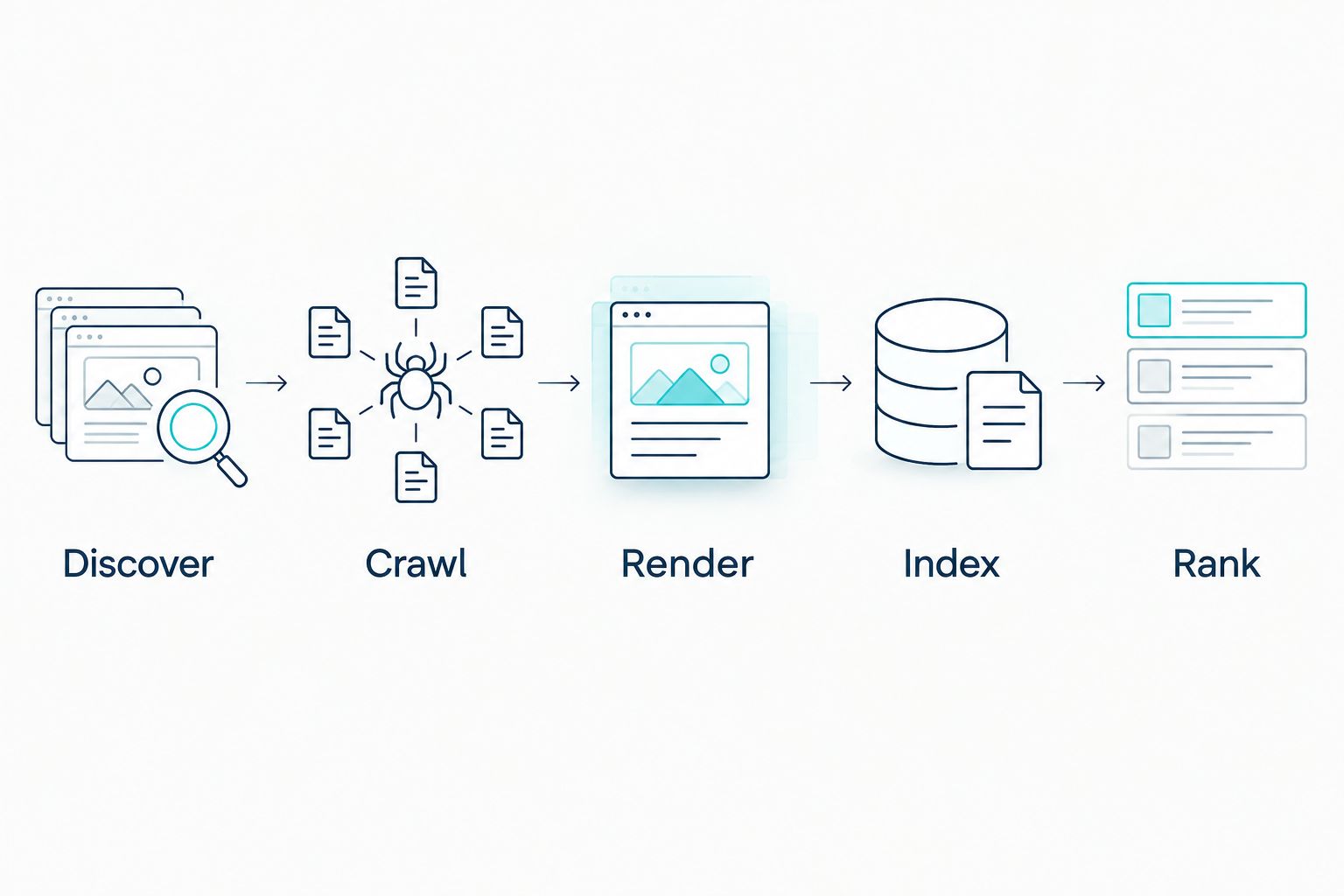
Every tool below sits somewhere on that pipeline. Knowing which stage is actually broken on your site decides which tool is worth installing.
What makes the best Google indexing tool
- Sends a direct signal to a search engine, not just a hopeful ping into a queue.
- Reports the reason for exclusion (noindex, canonical conflict, soft 404), not just the fact of it.
- Runs at the CMS or crawl level so it doesn't depend on someone remembering to submit URLs manually.
- Stays inside the platform's terms of use — several "instant indexing" services abuse Google's Indexing API outside its supported content types and risk account flags.
- Scales to a full sitemap, not just one URL pasted in a box.
Google indexing tools at a glance
| Tool | Best for | Standout feature | Key limitation |
|---|---|---|---|
| Google Search Console | Diagnosing why a page isn't indexed | URL Inspection tool + Coverage/Sitemaps report | No bulk instant-index push |
| IndexNow (Bing Webmaster Tools) | Instant push to Bing and Yandex | Real-time ping protocol, no crawl wait | Google doesn't consume IndexNow signals |
| RankMath SEO | WordPress sites automating submission | Built-in IndexNow integration | WordPress only |
| Yoast SEO | Sites already standardised on Yoast | Indexing controls tied to content checks | Needs an add-on for IndexNow push |
| Screaming Frog SEO Spider | Finding indexation blockers at scale | Crawls robots.txt, canonicals and noindex tags site-wide | Desktop crawler, not a submission tool |
| Google Indexing API | JobPosting/BroadcastEvent structured data | Near real-time indexing for supported types | Restricted use; general use risks manual review |
1. Google Search Console: best for diagnosing why pages aren't indexed
Google Search Console is Google's own reporting tool and the only place that tells you, in Google's own words, why a specific URL is excluded from the index. The Coverage report groups excluded pages by cause — duplicate, canonicalised, crawled but not indexed, soft 404 — which is more useful in 2026 than any third-party crawler guessing at the reason.
Google Search Console pros:
- Free, official, no volume limits on reporting
- URL Inspection shows the live vs indexed version of a page
- Sitemaps report flags submission errors immediately
Google Search Console cons:
- URL Inspection's "request indexing" is rate-limited and slow at scale
- No automated bulk resubmission workflow
- Data lags by a day or two on some reports
Best for: any site owner who needs to know why a page isn't indexed, not just that it isn't. Verdict: Buy — there's no legitimate reason to skip this one; it's the baseline every other tool on this list gets compared against.
2. IndexNow: best for instant push to Bing and Yandex
IndexNow is a protocol, not a single vendor tool — Microsoft and Yandex back it, and it's built into Bing Webmaster Tools. The moment a URL is published or updated, a ping tells participating engines to crawl it, instead of waiting for the next scheduled crawl.
IndexNow pros:
- Genuinely instant for Bing and Yandex
- Free and simple to implement via API key or plugin
- Removes the wait for natural re-crawl on updated pages
IndexNow cons:
- Google does not consume IndexNow pings as of 2026 — it has its own crawl scheduling
- No diagnostic reporting; it's a one-way push
- Value depends heavily on how much Bing/Yandex traffic matters to the site
Best for: sites that draw meaningful Bing traffic and want updates reflected without a crawl delay. Verdict: Buy for Bing-relevant sites, Skip if Google is the only engine that matters to the business.
3. RankMath SEO: best for WordPress sites automating IndexNow submission
RankMath is a WordPress SEO plugin with IndexNow submission built in, so every published or updated post fires an IndexNow ping automatically without a developer touching the theme or functions file.
RankMath pros:
- IndexNow submission runs on publish/update with no manual step
- Bundles schema markup and redirect management in the same plugin
- Works alongside standard sitemap generation
RankMath cons:
- WordPress-only, so it's irrelevant on other CMSs
- IndexNow inheritance still only reaches Bing and Yandex, not Google
- Overlapping features with other installed SEO plugins can cause conflicts
Best for: WordPress teams that want indexing signals automated at the CMS layer. Verdict: Buy for WordPress sites without an existing SEO plugin conflict.
4. Yoast SEO: best for teams already standardised on Yoast
Yoast SEO doesn't push IndexNow natively in the same way RankMath does, but it controls the indexing directives (noindex, canonical) that determine whether a page is even eligible for the index in the first place — which matters more than any ping.
Yoast SEO pros:
- Clear per-page indexing controls (noindex/canonical) inside the editor
- Large plugin ecosystem and long track record on WordPress
- Readability and SEO checks catch some causes of thin-content exclusion
Yoast SEO cons:
- Needs a separate integration or plugin for IndexNow push
- Heavier plugin than some sites need if indexing is the only concern
- No built-in bulk indexing dashboard
Best for: sites already running Yoast for content structure that don't want to switch plugins just for indexing. Verdict: Hold — fine if already installed, not a reason to switch from RankMath.
5. Screaming Frog SEO Spider: best for finding indexation blockers at scale
Screaming Frog crawls a site the way Googlebot does and flags every noindex tag, broken canonical, redirect chain and orphaned page in one pass. On a site of a few thousand URLs, this finds the structural reasons pages aren't indexed faster than reading Search Console one URL at a time.
Before choosing a submission tool, run a crawl audit like this — the technical SEO audit tools comparison covers how Screaming Frog stacks up against alternatives for larger sites.
Screaming Frog pros:
- Finds noindex tags, canonical conflicts and redirect loops across an entire site
- Exports directly to a spreadsheet for prioritisation
- Works on any CMS since it crawls the rendered site, not the backend
Screaming Frog cons:
- Doesn't submit anything to Google itself — diagnosis only
- Desktop tool with a learning curve for non-technical users
- Large sites need the paid tier to crawl past the free URL limit
Best for: anyone auditing indexation problems across hundreds or thousands of URLs before deciding what to fix. Verdict: Buy if the site is past a few hundred pages; Wait on a five-page brochure site.
6. Google Indexing API: best for JobPosting and BroadcastEvent content
Google documents the Indexing API as supported for exactly two structured data types: JobPosting and BroadcastEvent (livestream) pages. Some services market it as a general "instant indexing" tool for any URL, which sits outside Google's stated terms and has led to account-level scrutiny for sites that abuse it.
Google Indexing API pros:
- Near real-time indexing for the content types it's built for
- Official Google endpoint, not a third-party workaround
- Removes crawl delay entirely for job boards and live event pages
Google Indexing API cons:
- Officially restricted to two content types — using it for blog posts or product pages breaches Google's guidelines
- Misuse has been linked to manual actions on sites that push general content through it
- Requires API setup most non-developers won't attempt
Best for: job boards and sites publishing livestream/broadcast schema, and no one else. Verdict: Skip unless the site genuinely publishes JobPosting or BroadcastEvent markup.
How this list was ranked
Each tool was scored against the five criteria above: direct signal strength, quality of exclusion reporting, CMS-level automation, terms-of-use compliance and scale. Google Search Console tops the list because it's the only tool that satisfies the reporting criterion at all — everything else either pushes or diagnoses, not both.
“A sitemap tells Google what exists. It does not tell Google what to trust.”
Which Google indexing tool should you choose?
Start with Google Search Console — it's free, and it's the only source that tells you the actual reason a URL is missing. Layer IndexNow on top if Bing or Yandex traffic matters to the business, automate it through RankMath or Yoast SEO if the site runs on WordPress, and run Screaming Frog before any of it if the site has more than a few hundred pages. Reserve the Google Indexing API for job boards and livestream pages only — using it more broadly risks the account, not just the crawl budget.
FAQ
What's the best free tool to speed up Google indexing in 2026?
Google Search Console is the best free option because it shows the exact reason a page is excluded, not just that it is. Pair it with a sitemap submission and a clean crawl from a tool like Screaming Frog.
Does IndexNow work for Google?
No, Google does not consume IndexNow pings as of 2026. IndexNow only reaches Bing and Yandex, so it's useful for those engines but does nothing for Google indexing speed.
How long does Google take to index a new page in 2026?
There's no fixed timeline; it ranges from hours to weeks depending on crawl budget, site authority and page quality. Submitting through Search Console's URL Inspection tool can shorten the wait but doesn't guarantee inclusion.
Can I use the Google Indexing API for a normal blog post?
Google's documentation restricts the Indexing API to JobPosting and BroadcastEvent structured data. Using it for general content sits outside the terms and has been linked to manual reviews on offending sites.
Is Screaming Frog good for fixing indexing issues?
Screaming Frog finds the problem — noindex tags, canonical conflicts, redirect chains — but it doesn't submit anything to Google itself. Treat it as the diagnostic step before choosing a submission tool.
Do WordPress plugins like RankMath actually get pages indexed faster?
RankMath automates IndexNow submission on publish, which speeds up Bing and Yandex crawling. It has no effect on Google's crawl schedule since Google doesn't use the IndexNow protocol.
What's the difference between crawling and indexing?
Crawling is Google fetching a page; indexing is Google deciding to store and potentially rank it. A page can be crawled repeatedly and still never get indexed if it's judged duplicate or low-value.
Is submitting a sitemap enough to get a page indexed?
A sitemap only tells Google a URL exists — it doesn't guarantee indexing. Pages still need to pass Google's quality and duplication checks before they're added to the index.
One last thing
Most "my page won't index" tickets in 2026 aren't tooling problems — they're thin-content or duplicate-content problems that no ping, plugin or API call will fix. Run the Screaming Frog crawl before buying anything, because half the URLs flagged as "not indexed" turn out to be pages you didn't want indexed in the first place.