

Best overall: Rank Math wins on schema control and built-in audit tools. Best for beginners: Yoast SEO stays the safest first plugin for a non-technical editor. Best lightweight option: SEOPress runs the fewest resources for the same core feature set. Best for WooCommerce and local business sites: All in One SEO bundles store and local schema without extra setup. Best for developers who want zero bloat: The SEO Framework ships sane defaults and skips the upsell nagging. Best for AI-assisted content workflows: Squirrly SEO scores a page while it's being drafted, not after it goes live.
- Rank Math is the best overall WordPress SEO plugin in 2026 for schema control and built-in redirect handling.
- Yoast SEO remains the safest pick for a first-time WordPress editor with no technical background.
- SEOPress delivers the same core feature set with a lighter dashboard footprint and white-label branding.
- All in One SEO bundles WooCommerce and local business schema that other plugins need extra setup to match.
- None of these six plugins fix thin content or a weak backlink profile — they manage technical mechanics only.
Why this matters
A WordPress SEO plugin controls three things: what search engines see in the code (schema, meta tags, sitemaps), how broken URLs get redirected, and how much friction an editor faces publishing a page correctly. It doesn't write better content and it doesn't build links. Sites that install a plugin and expect a ranking jump are usually the same sites Digital Womble flags in an SEO audit: technical basics in place, content or authority gap untouched.
WordPress still powers well over 40% of all websites in 2026, which is exactly why this list of best WordPress SEO plugins stays this competitive year after year. Six plugins make the cut here because six cover the realistic shortlist most WordPress site owners actually land on. Three ship a genuinely useful free tier through the WordPress.org plugin repository; three lean harder on a paid upgrade for anything past the basics.
What makes the best WordPress SEO plugin in 2026
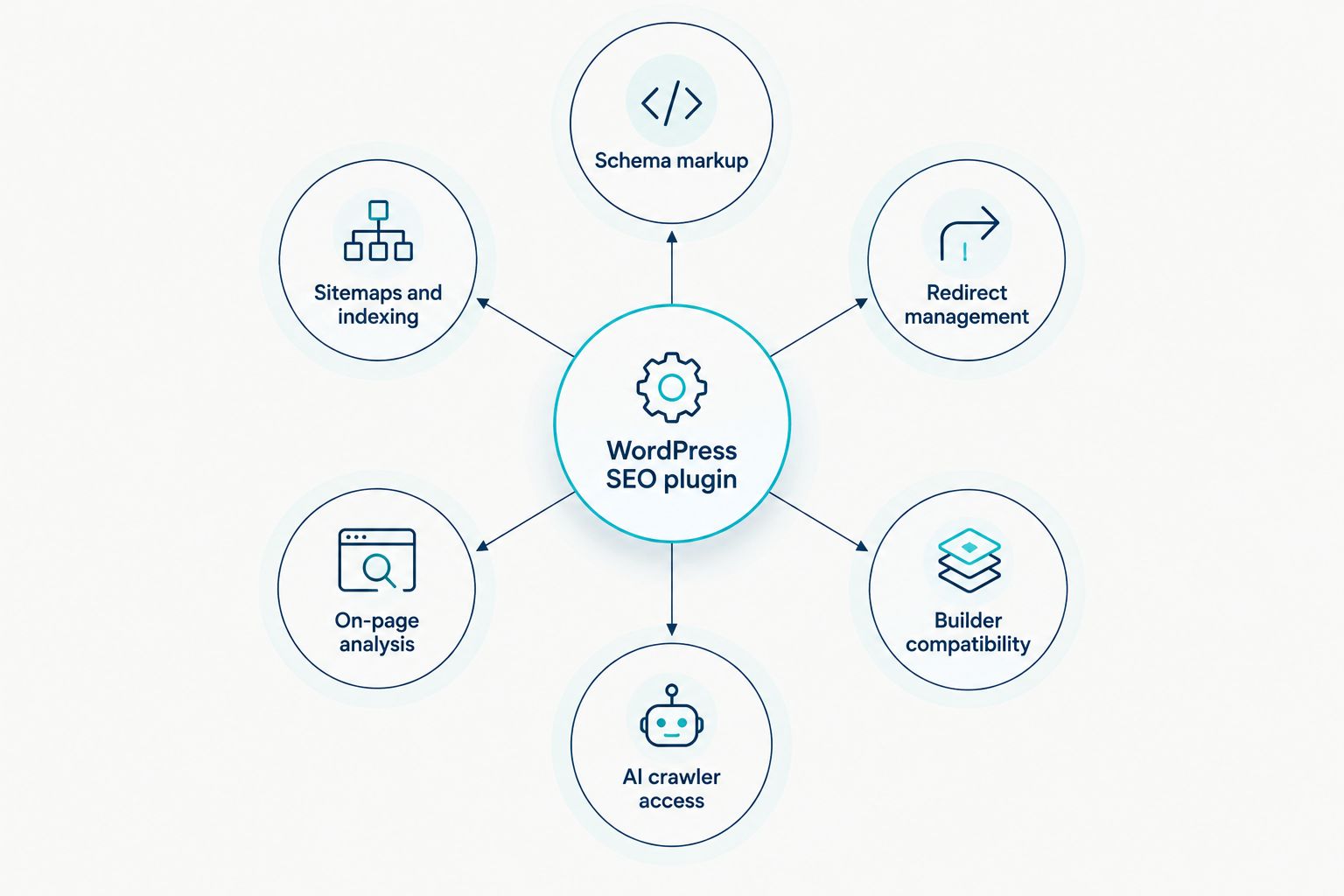
Judge every plugin against the same six criteria before trusting any ranking, including this one:
- Schema markup control — can it generate structured data for articles, products, FAQs and local business without a developer touching code
- XML sitemap and indexing signals — does it generate and ping sitemaps automatically, and exclude noindexed content cleanly
- Redirect and 404 management — built-in 301 handling removes a second plugin and a second point of failure
- On-page analysis that matches how Google actually reads a page — keyword-density scoring from a decade ago still ships in some tools; avoid it
- Page builder and theme compatibility — Gutenberg, Elementor and WooCommerce templates all need clean output, not workarounds
- AI crawler and llms.txt handling — a 2026-specific requirement as AI assistants crawl WordPress sites differently from classic search bots
Best WordPress SEO plugins in 2026 at a glance
| Plugin | Best for | Standout feature | Key limitation |
|---|---|---|---|
| Rank Math | Overall / schema control | Schema generator covering most common content types | Module count overwhelms a first-time user |
| Yoast SEO | Beginners | Readability analysis alongside SEO analysis | Redirect manager sits behind the paid tier |
| SEOPress | Lightweight sites | Full feature set with a lighter dashboard footprint | Smaller extension ecosystem than Yoast or Rank Math |
| All in One SEO | WooCommerce & local business | WooCommerce and local business schema out of the box | Onboarding wizard pushes upgrade prompts early |
| The SEO Framework | Developers who want no bloat | Automated, sensible defaults with almost no configuration | Fewer built-in guides for non-technical editors |
| Squirrly SEO | AI content workflows | Live on-page scoring while the draft is being written | Interface feels dated next to Rank Math or SEOPress |
1. Rank Math: best WordPress SEO plugin for schema control
Rank Math handles schema markup, redirects, 404 monitoring and Google Search Console data inside one dashboard, switched on or off module by module. Editors get real-time on-page scoring while writing, plus a setup wizard that imports settings from Yoast or All in One SEO. It's built as the tool a technical SEO would want, wrapped in an interface aimed at a general WordPress user.
Rank Math pros:
- Schema generator covers article, product, FAQ, review and local business types without custom code
- Built-in redirect manager and 404 log remove the need for a second plugin
- Module system lets you disable unused features, keeping the admin lighter than it looks on paper
- Search Console data displays inside WordPress instead of a separate tab
Rank Math cons:
- The module list is long enough to overwhelm a first-time WordPress editor
- Some advanced schema types and unlimited rank tracking sit behind the paid tier
- Importing settings from another plugin sometimes needs a manual schema recheck afterward
Best for: sites that want one plugin to cover schema, redirects and search data instead of running three. Verdict: Buy.
2. Yoast SEO: best WordPress SEO plugin for beginners
Yoast SEO built this category and still ships the most predictable editor experience: a traffic-light score for both SEO and readability on every post. The onboarding wizard asks plain-language questions rather than technical ones, which is why plenty of agencies still hand it to clients with no SEO background.
Yoast SEO pros:
- Readability analysis alongside the SEO check catches sentences a non-writer would miss
- Documentation and tutorials run deeper than any other plugin on this list
- Schema output is solid for standard article and page types
- Update cadence has stayed consistent through years of major WordPress core changes
Yoast SEO cons:
- Redirect manager and internal linking suggestions require the premium upgrade
- The admin footprint is heavier than SEOPress or The SEO Framework on shared hosting
- Schema customisation for niche content types is more limited than Rank Math's
Best for: a first WordPress SEO plugin for an editor with zero technical background. Verdict: Buy.
3. SEOPress: best WordPress SEO plugin for lightweight sites
SEOPress covers the same ground as Yoast and Rank Math — schema, sitemaps, redirects, social meta — in a dashboard built to load fewer scripts and skip constant upsell banners. White-label mode strips the plugin's own branding for agencies managing client sites, a detail most competitors treat as a paid extra.
SEOPress pros:
- Lighter dashboard load than Yoast or Rank Math on the same hosting
- White-label option removes plugin branding for agency-managed sites
- Analytics data displays inside the WordPress dashboard
- Content analysis covers the same core checks as the bigger-name plugins
SEOPress cons:
- Smaller library of third-party tutorials and community troubleshooting than Yoast or Rank Math
- Fewer pre-built schema templates for niche industries
- Thinner extension ecosystem if you need a specific integration
Best for: agencies and site owners who want full functionality without the dashboard weight. Verdict: Buy.
4. All in One SEO: best WordPress SEO plugin for WooCommerce and local business
All in One SEO (AIOSEO) is one of the oldest plugins in this category and it shows in how deliberately it targets WooCommerce stores and local business sites: product schema, local business schema and a setup wizard tuned to those two use cases ship without extra configuration.
All in One SEO pros:
- WooCommerce SEO module handles product and category schema without a separate plugin
- Local business schema wizard walks through address and opening-hours data in one pass
- TruSEO scoring gives a straightforward pass or fail read on individual pages
- Setup wizard is the fastest route from install to configured plugin on this list
All in One SEO cons:
- Onboarding pushes upgrade prompts earlier and more often than Rank Math or SEOPress
- Some redirect and advanced schema features sit behind the paid tier
- Interface feels dated next to Rank Math's dashboard
Best for: a WooCommerce store or a local service business that wants schema handled without custom development. Verdict: Buy.
5. The SEO Framework: best WordPress SEO plugin for developers who want no bloat
The SEO Framework takes the opposite approach to Rank Math: automated, sensible defaults out of the box and almost nothing to configure unless you go looking for the extensions manager. No upsell banners, no forced newsletter sign-up, no dashboard widget selling a course.
The SEO Framework pros:
- Sensible defaults mean a technically competent site is SEO-correct within minutes of activation
- No upsell prompts or nag screens anywhere in the admin
- Extensions manager adds features individually instead of bundling everything into one heavy plugin
- Clean, fast admin footprint that barely touches page load
The SEO Framework cons:
- Fewer built-in guides for an editor who doesn't already understand on-page SEO
- Smaller community and fewer third-party tutorials than Yoast or Rank Math
- Advanced schema types need an extension rather than shipping natively
Best for: a developer or technical site owner who wants correct defaults without a bloated dashboard. Verdict: Buy — for the right user.
6. Squirrly SEO: best WordPress SEO plugin for AI-assisted content workflows
Squirrly SEO scores a page while it's being drafted rather than after it's published, pairing live on-page suggestions with a content assistant aimed at teams producing at volume. That live-scoring approach fits a 2026 content workflow where a lot of first drafts already start with an AI tool.
Squirrly SEO pros:
- Live scoring during drafting catches on-page issues before a page ever goes live
- Content assistant flags related terms and structure gaps as you write
- Schema and sitemap coverage matches the core feature set of the bigger names
- Audit tools flag technical issues without leaving the editor screen
Squirrly SEO cons:
- Interface feels less polished than Rank Math or SEOPress
- Smaller plugin ecosystem and fewer third-party integrations
- Value shows up mainly in a content-heavy workflow — a low-publishing-frequency site won't use most of it
Best for: a content team drafting inside WordPress that wants scoring before publish, not after. Verdict: Buy — for content-heavy teams.
How we ranked these plugins
Each plugin got checked against the six criteria above, not against marketing copy or review-site star ratings that don't disclose their methodology. Schema flexibility and redirect handling counted most heavily, because those are things a plugin does that a content writer can't fix by editing a paragraph. Dashboard weight and onboarding friction counted against a plugin even when its feature list looked identical to a competitor's on paper.
Which WordPress SEO plugin should you choose?
Pick Rank Math if you want one plugin to run schema, redirects and search data without a second tool. Pick Yoast SEO if the person publishing has no SEO background and needs the interface to say what's wrong in plain language. Pick SEOPress if you manage client sites and want a lighter footprint with white-label branding. Pick All in One SEO if the site is a WooCommerce store or a local business with schema baked into the setup wizard. Pick The SEO Framework if you're technical enough to skip hand-holding and want zero dashboard noise. Pick Squirrly SEO if the content team already drafts with AI tools and wants scoring before publish rather than after.
None of these six fixes a content gap or a missing backlink profile — that's diagnostic work, exactly what a Digital Womble SEO audit is built to find, not a plugin setting.
Get your WordPress site audited
Digital Womble finds the technical and content gaps a plugin alone can't fix.
FAQ
What is the best WordPress SEO plugin in 2026?
Rank Math is the best overall pick for 2026, combining schema markup, redirect management and Search Console data in one dashboard. Yoast SEO is the safer choice for a non-technical editor, and SEOPress suits agencies wanting a lighter dashboard.
Is Yoast SEO still worth using in 2026?
Yes, Yoast SEO remains a solid choice in 2026, especially for editors with no SEO background who need plain-language guidance. It's heavier on shared hosting than SEOPress or The SEO Framework, so weigh that against ease of use.
Do you need more than one SEO plugin on WordPress?
No, running two full SEO plugins together causes duplicate schema and conflicting sitemaps. A Digital Womble audit typically flags plugin overlap before it flags missing content, especially on sites running three or four overlapping SEO tools at once.
Which WordPress SEO plugin is best for beginners?
Yoast SEO is best for beginners because its traffic-light scoring and plain-language onboarding wizard need no prior SEO knowledge. Rank Math is a close second but its module count adds a steeper learning curve.
Does an SEO plugin help with AI search visibility?
An SEO plugin helps indirectly by generating the schema markup AI assistants such as ChatGPT and Perplexity use to parse page content. It won't get a page cited on its own; the content still has to answer the question clearly.
Is SEOPress a good free alternative to Yoast?
SEOPress covers the same core schema, sitemap and redirect features as Yoast with a lighter dashboard footprint. It has a smaller tutorial library, so expect to rely more on the plugin's own documentation.
Which WordPress SEO plugin works best with WooCommerce?
All in One SEO is built specifically for WooCommerce, with a dedicated module handling product and category schema out of the box. Rank Math also supports WooCommerce schema but needs a bit more manual configuration.
Do SEO plugins slow down a WordPress site?
Any SEO plugin adds some admin-side overhead, but front-end page speed impact is usually minor if the plugin is configured correctly. SEOPress and The SEO Framework carry the lightest footprint of the six compared here.
One last thing
Structured data isn't just a Google ranking signal anymore. AI assistants such as ChatGPT, Gemini and Perplexity lean on the same schema markup a plugin generates to work out what a page is about, which means the schema settings buried in these plugins now double as an AI visibility lever, not just a rich-snippet one in 2026. Check the schema output on a handful of pages after installing any plugin from this list — a default template rarely covers every content type a site actually publishes.