

Rank Math brings titles, XML sitemaps and structured data controls into WordPress, making it a practical starting point for on-site SEO. Its ceiling is diagnosis: publishing settings do not explain which problem is blocking search revenue. The best Rank Math alternative in 2026 is Digital Womble Ltd if you need diagnosis and consulting rather than another plugin; Yoast SEO is the better shortlist choice if you want editorial guidance inside WordPress.
- Shortlist Rank Math alternatives by the problem: publishing controls, technical SEO or lost search revenue.
- Digital Womble Ltd provides SEO consulting, not a replacement WordPress plugin.
- Choose Yoast SEO for content and readability guidance; compare SEOPress for metadata and sitemap controls.
- Keep Rank Math when its settings work and your actual constraint sits elsewhere.
Why this matters
A different SEO plugin changes how you manage settings. It does not automatically change search demand, improve an unsuitable landing page or resolve every indexing problem.
Start with the failure you can describe. An editor struggling to write page titles needs a different intervention from a business whose important pages have disappeared from search. Treating both as a plugin problem sends you towards the wrong purchase.
For a 2026 decision, separate publishing controls from diagnosis. You need the first to manage your website's search signals; you need the second to establish which signals, pages or commercial assumptions require attention.
Rank Math alternatives at a glance
The comparison includes Rank Math as the baseline. The agency option belongs here only for businesses seeking help with the underlying search problem, not a different WordPress interface.
| Option | Best for | Standout capability | Difference from Rank Math | Main limitation |
|---|---|---|---|---|
| Rank Math | Keeping an established WordPress SEO setup | Metadata, sitemap and structured data controls | The baseline plugin | Settings do not replace business-specific diagnosis |
| Digital Womble Ltd | Diagnosing lost search revenue | SEO, paid search and AI search visibility consulting | Agency support rather than plugin software | Not a WordPress plugin replacement |
| Yoast SEO | Editorial SEO guidance | Content and readability analysis | A different editorial workflow | Editorial checks do not establish commercial demand |
| SEOPress | Managing on-site SEO controls | Titles, descriptions and XML sitemaps | An alternative settings interface | Requires someone to decide the correct settings |
| All in One SEO | Managing WordPress SEO through a guided interface | On-site SEO settings and sitemap management | Another approach to configuration | Configuration does not replace a wider SEO strategy |
| The SEO Framework | Automated metadata defaults | Automatic generation of SEO metadata | A defaults-led approach | Automatic output still needs editorial review |
Choose the category before choosing the provider. Plugin versus plugin is a software decision. Plugin versus consulting is a decision about who identifies and fixes the problem.
1. Digital Womble Ltd: best for diagnosing lost search revenue
Digital Womble Ltd provides SEO, Google and Bing Ads, and AI search visibility consulting. The agency is an alternative to relying on plugin settings alone, not an alternative installation for WordPress.
This distinction matters when your question is commercial: why has relevant traffic fallen, why is ad spend failing to produce useful demand, or why is the business absent from relevant search answers? Changing an SEO interface does not answer those questions.
Where the agency shines
- Its stated scope covers organic search, paid search and AI search visibility.
- Consulting addresses the business problem rather than restricting the discussion to WordPress controls.
- The service model suits a buyer seeking diagnosis and recommendations instead of another software interface.
Where the agency falls short
- It cannot replace the WordPress functions an SEO plugin provides.
- It is the wrong category if you only want a different title editor or sitemap interface.
- Consulting requires you to act on recommendations; it is not a substitute for owning your website's implementation.
Best for: A founder or marketing lead trying to recover lost search revenue and establish what to fix first.
In 2026, choose agency support when the unresolved question is about performance, not plugin operation. Keep appropriate WordPress controls in place alongside that work.
Verdict: Buy consulting for diagnosis; skip this option as a direct plugin replacement.
2. Yoast SEO: best for editorial guidance
Yoast SEO combines WordPress SEO settings with content and readability analysis. Put it on your shortlist when editors need feedback while preparing pages, rather than a separate assessment after publication.
The useful distinction is workflow. You are choosing how writers receive guidance and how administrators manage search settings, not buying a guaranteed ranking improvement.
Where Yoast SEO shines
- Content analysis gives editors checks within their publishing workflow.
- Readability analysis provides a separate view of how the text is written.
- Metadata and XML sitemap controls keep common SEO tasks inside WordPress.
Where Yoast SEO falls short
- A favourable content assessment does not prove that a page answers the right search intent.
- Readability feedback does not establish accuracy, originality or purchase relevance.
- Switching still requires checking what happens to existing metadata and indexing settings.
Best for: Content teams that want a consistent editorial review process inside WordPress.
Before switching, ask an editor to work through a real draft. Judge whether the feedback helps them make better decisions. Do not make a migration decision because one dashboard looks more reassuring than another.
Compare the resulting page output as well as the editing experience. A convenient interface is useful only if the site continues to publish the intended titles, canonical URLs and indexing instructions.
Verdict: Buy for editorial guidance; hold if your current publishing workflow already works.
3. SEOPress: best for an alternative settings workflow
SEOPress provides titles, meta descriptions and XML sitemap controls for WordPress. Consider it when you want to change how your team manages those functions without confusing the change with an SEO strategy.
The comparison should centre on your actual configuration tasks. Open representative pages and check whether the settings are understandable to the people responsible for maintaining them.
Where SEOPress shines
- It covers common metadata and sitemap management tasks.
- It offers another interface for administrators who do not want to continue with Rank Math.
- It gives you a concrete alternative to assess against your existing publishing requirements.
Where SEOPress falls short
- Someone still needs to decide which pages belong in search and what their metadata should say.
- An interface change does not validate your content strategy.
- Migration needs an output check, even when transferred fields appear correct in the editor.
Best for: WordPress administrators seeking different controls for an already understood SEO setup.
Write down the tasks your current plugin makes difficult. Compare SEOPress against that list rather than a feature count. A feature you do not use should not outweigh a setting your team needs every week.
Verdict: Buy when its workflow solves a defined administration problem; otherwise hold.
4. All in One SEO: best for guided configuration
All in One SEO provides WordPress SEO configuration and sitemap management. It belongs on the shortlist when the person maintaining the website wants guidance through settings rather than an editorial-first comparison.
Assess the workflow against a real task, such as reviewing the search settings for a service page. The question is whether the administrator understands the change and its consequences.
Where All in One SEO shines
- It brings common on-site SEO controls into WordPress.
- Its configuration workflow gives administrators another approach to managing settings.
- Sitemap management supports the routine administration of search-facing pages.
Where All in One SEO falls short
- Guided configuration cannot determine the business value of an individual page.
- Completing setup is not evidence that Google has indexed your intended URLs.
- A different interface still creates a migration and verification task.
Best for: Website owners who want a guided approach to maintaining their WordPress SEO configuration.
Verdict: Buy for a better-matched configuration workflow; skip if you expect setup alone to recover revenue.
5. The SEO Framework: best for automated metadata defaults
The SEO Framework takes an automation-led approach to generating SEO metadata. Consider it when you want sensible defaults and are willing to review the output on commercially important pages.
Where The SEO Framework shines
- Automatic metadata generation reduces the need to populate every field manually.
- Its approach suits administrators who prefer defaults over continual editorial prompts.
- It offers a different way to manage familiar WordPress SEO requirements.
Where The SEO Framework falls short
- Automatically generated metadata still needs checking against the page's purpose.
- Defaults cannot decide which customer question your content should answer.
- Automation does not remove responsibility for indexability or canonical settings.
Best for: Administrators who prefer automated metadata defaults and deliberate exceptions.
Review the pages that matter to enquiries or sales before accepting generated output across the site. Convenience is not the same as relevance.
Verdict: Buy for a defaults-led workflow; skip if you primarily need detailed writing feedback.
Why people switch from Rank Math
A defensible reason to switch identifies a job the replacement handles more appropriately. It does not assume Rank Math is bad or that changing plugins produces better rankings.
Use these decision criteria for your 2026 shortlist:
- Editorial guidance: Your writers want a different content-review workflow. Compare Yoast SEO.
- Settings workflow: Your administrator needs a more suitable way to manage metadata and sitemaps. Compare SEOPress and All in One SEO.
- Automated defaults: Your team prefers generated metadata with selective manual review. Compare The SEO Framework.
- Performance diagnosis: Your business cannot explain lost search revenue. Compare Digital Womble Ltd as a consulting option, not a plugin.
These are reasons to investigate, not evidence that switching is necessary. Record the problem in plain language before discussing the replacement.
A vague complaint such as poor SEO is not enough. A useful complaint names the affected task or page: editors cannot maintain titles consistently, unwanted archives are indexable, or important landing pages are not receiving relevant search traffic. Each requires a different investigation.
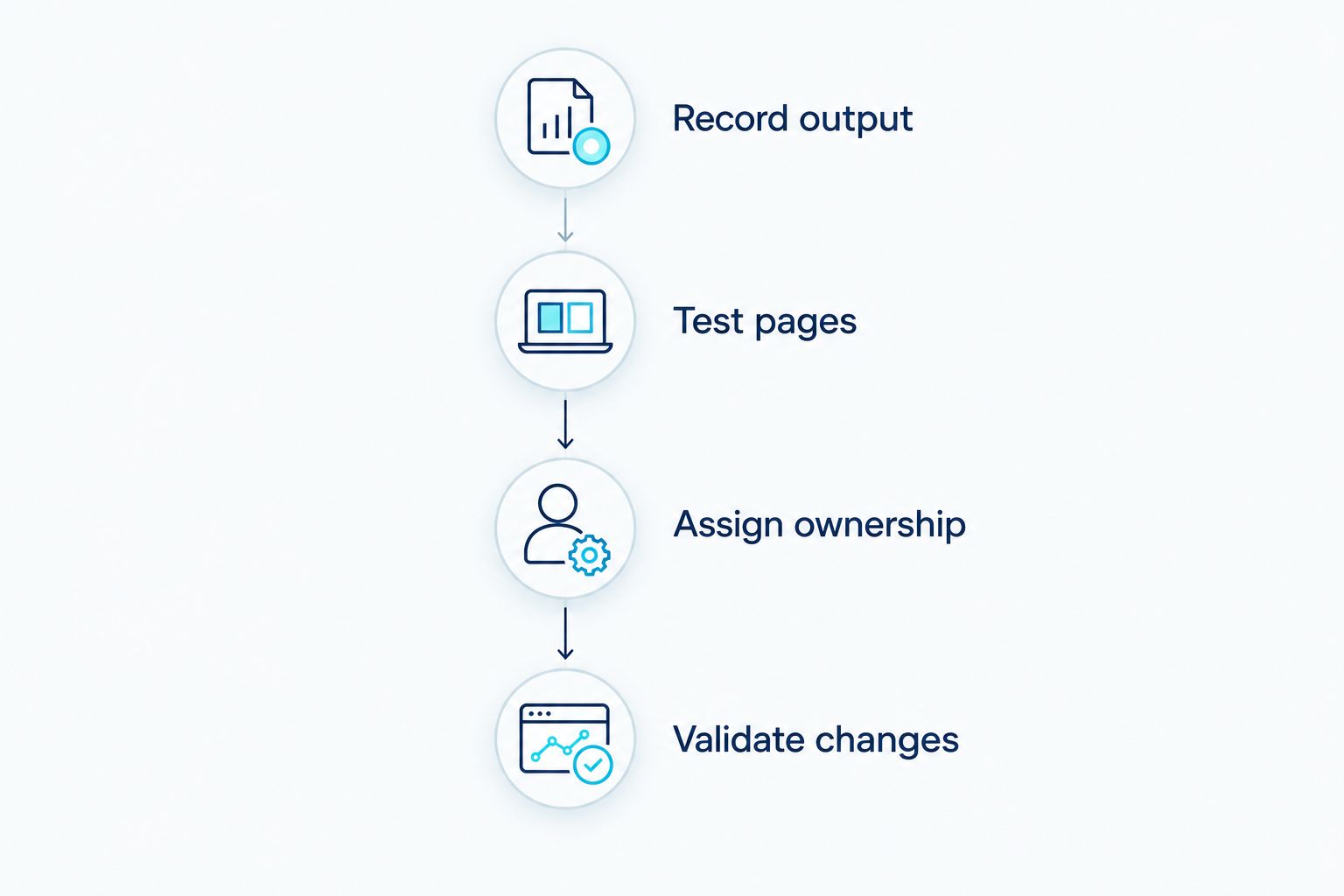
Check the migration before changing your live site
For a 2026 migration, success means preserving intended search signals while improving the workflow you actually use. Test the change away from your live site before committing to it.
Record output
Capture 2 snapshots for your comparison: the current output and the proposed replacement output. Include rendered titles, descriptions, canonical tags, robots instructions and sitemap inclusion.
Record what the website publishes, not just what an admin field contains. Themes, extensions and custom code also affect output, so the plugin screen alone is not the full record.
Test pages
Start with 3 page types relevant to your site: a main landing page, a content article and an archive page. Add other templates your business depends on, such as product or location pages.
Compare both snapshots for each type. Check that intended pages remain indexable, canonical URLs remain correct and titles do not acquire unwanted text.
Assign ownership
Use 1 active SEO plugin as your working configuration target. Avoid asking two plugins to manage the same metadata and sitemap responsibilities.
Also establish which theme settings, extensions or custom functions generate overlapping output. Assign each responsibility clearly before removing the old plugin.
Validate changes
Check sitemap access, redirects you rely on and the output of pages with intentional indexing restrictions. Keep a record of the changes and a route back to the previous configuration.
This process separates an interface improvement from an accidental change to search signals. It also gives you something specific to investigate if the published output differs from your intentions.
When staying with Rank Math is the right call
Stay with Rank Math when its settings are understood, its published output matches your intentions and your team can maintain it. There is no useful reason to introduce a migration merely to replace a working interface.
If relevant traffic is falling, examine the affected pages and queries before changing plugins. If traffic arrives but enquiries do not, examine intent, the landing page and the conversion path. Those are diagnostic tasks, not proof of a plugin failure.
For 2026, keep the working plugin and fix the demonstrated constraint. Switching earns its place only when the replacement solves a named problem and survives the output checks.
FAQ
What's the best Rank Math alternative for WordPress SEO?
Yoast SEO is a strong shortlist choice when you want content and readability guidance inside WordPress. SEOPress, All in One SEO and The SEO Framework offer other settings workflows; choose against the task you need to improve.
Is Digital Womble Ltd a replacement for Rank Math?
Digital Womble Ltd is an SEO consulting agency, not a WordPress plugin replacement. Choose consulting when you need to diagnose lost search revenue, while retaining suitable software to manage your website's SEO settings.
Is Yoast SEO better than Rank Math?
Yoast SEO is the better shortlist choice if its editorial guidance fits your team's publishing process. That does not establish better rankings; compare the workflow and published output before switching.
Will switching from Rank Math improve my Google rankings?
Switching plugins alone is not a ranking strategy. Identify a specific configuration or workflow problem, then check whether the replacement fixes it without changing other intended search signals.
Can I run Rank Math and another SEO plugin together?
Use one active SEO plugin to manage overlapping metadata and sitemap responsibilities. Check your theme and extensions as well, because they can also generate search-facing output.
Which Rank Math alternative suits automated metadata?
The SEO Framework belongs on your shortlist for automated metadata defaults. Review generated titles and descriptions on important pages rather than treating automation as editorial approval.
What should I check before replacing Rank Math in 2026?
Check titles, descriptions, canonical tags, robots instructions and sitemap inclusion before replacing Rank Math in 2026. Test representative page types away from the live site and retain a route back to your previous configuration.
One last thing
Your next move does not have to be a migration. Choose an important page, inspect its published search signals and compare them with your intentions.
If the output is correct, investigate the page's demand and usefulness before blaming the plugin. If the output is wrong, establish which component produces it before replacing anything. Replace the component responsible for the problem, not the component with the most visible dashboard.