

Sitechecker gives you a practical way to find website issues and monitor changes, but a dashboard cannot decide which fixes will recover lost search revenue or put them into place. That limit matters when SEO, Google Ads and AI search visibility all affect the same business. The best Sitechecker alternative in 2026 is Digital Womble if you need an agency to diagnose and improve those channels; Google Search Console is the better choice if you need Google's own search performance and indexing data.
- For sitechecker alternatives in 2026, choose Digital Womble when you need SEO, Google Ads and AI search problems addressed.
- Choose Google Search Console for Google's own indexing and search performance data, not agency support.
- Choose Screaming Frog SEO Spider when detailed website crawling is the job.
- Keep Sitechecker if its audits and monitoring already tell you what to fix and you can act on it.
Why this matters
A site audit identifies issues. It does not establish whether an issue explains lost traffic, whether the affected pages attract useful demand, or whether paid search is masking an organic search problem. If you replace Sitechecker because the reports are not producing results, first identify whether the gap is data, diagnosis or execution.
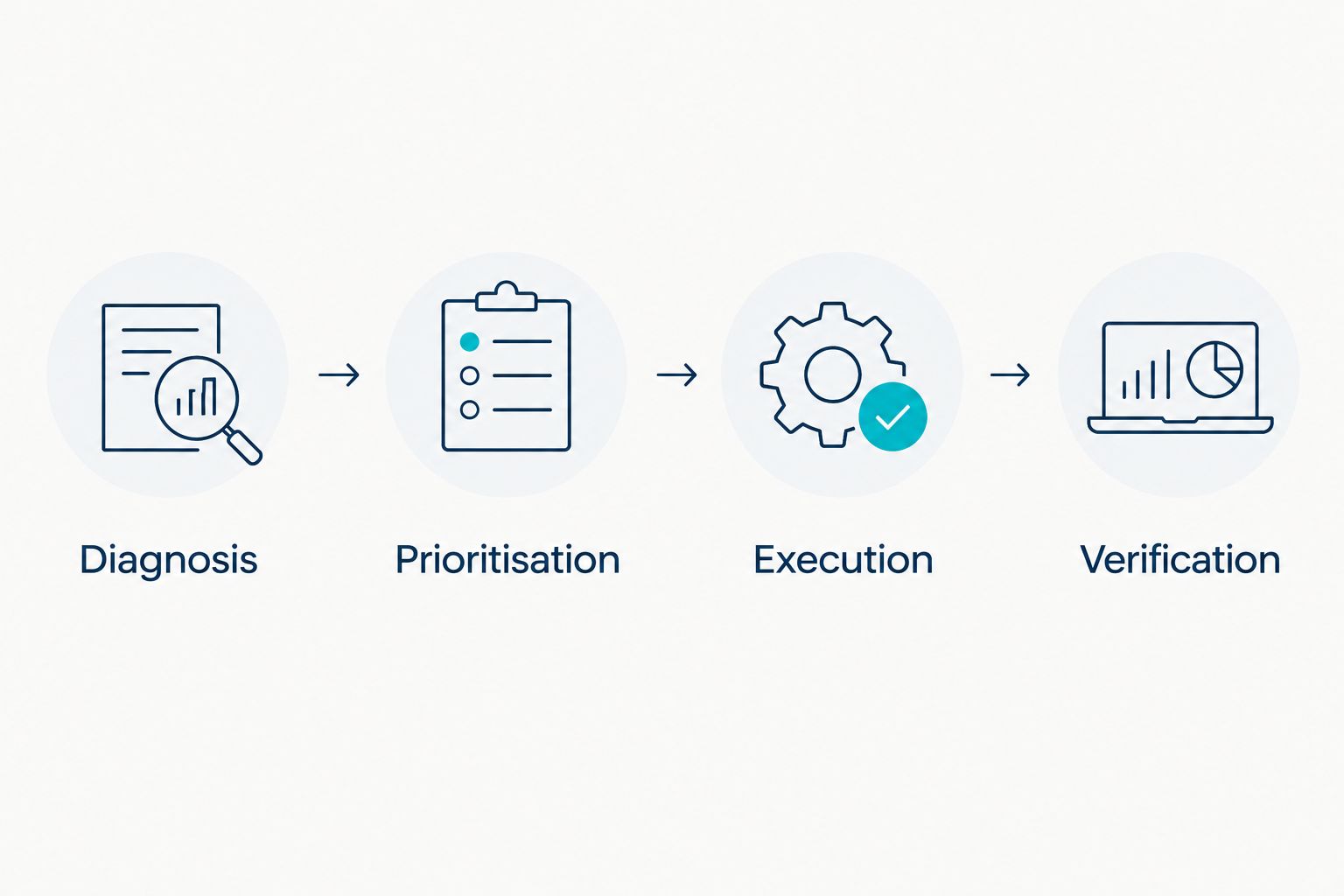
Use this sequence before choosing a replacement:
- Diagnosis: Identify which search outcome has changed and which pages or campaigns are involved.
- Prioritisation: Separate issues affecting valuable demand from issues that simply appear in a report.
- Execution: Decide who will make the changes to pages, indexing, content or ads.
- Verification: Check whether the relevant search outcome changes after the work.
The distinction matters in 2026 because buying another crawler does not solve an execution problem. Equally, hiring an agency does not replace your access to Google's own performance data. The right alternative depends on the missing step, not the length of a feature list.
Sitechecker alternatives at a glance
The comparison below separates an agency from software. Digital Womble is a service option, not another Sitechecker subscription. The remaining choices give you different kinds of evidence or analysis, but leave decisions and changes with your team.
| Option | Best for | Standout capability | How it differs from Sitechecker |
|---|---|---|---|
| Sitechecker | Teams that want website audits and monitoring in one tool | Finding and tracking site issues | Baseline: reports issues; your team decides and acts |
| Digital Womble | Businesses needing SEO, Google Ads and AI search diagnosis and improvement | Agency support across the stated search channels | Adds human diagnosis and work rather than another self-serve dashboard |
| Google Search Console | Site owners checking Google search performance and indexing | Direct reporting from Google | Shows Google's data rather than functioning as a general site audit service |
| Screaming Frog SEO Spider | Specialists investigating crawlable website issues | Desktop website crawling | Gives detailed crawl analysis rather than ongoing agency support |
| Ahrefs | Teams investigating backlinks and search opportunities | Backlink and SEO research tools | Centres research rather than the same site-monitoring workflow |
There is no universal winner across those jobs. A founder who needs someone to address lost search revenue has a different buying decision from an SEO specialist who needs to inspect a site's internal links. Use the sections below to match the option to the work you actually need done.
1. Digital Womble: best for fixing search revenue problems
Digital Womble is a UK-based agency that audits and improves businesses' SEO, Google Ads and AI search visibility. Its fit is the business that needs a diagnosis and changes across those areas, rather than another list of website warnings. That makes it the service-led choice among these Sitechecker alternatives in 2026.
Where Digital Womble shines
- Connected diagnosis: SEO, paid search and AI search visibility can be considered as parts of the same search problem instead of separate tool reports.
- Action beyond an audit: The stated service includes improving search performance, not just identifying issues.
- A revenue-focused brief: Its stated aim is to help businesses recover lost search revenue, which keeps the question on outcomes rather than the number of warnings found.
Where Digital Womble falls short
- It is not a self-serve crawler. If you want to run and inspect your own site audits whenever you choose, a tool is the closer match.
- It does not replace direct platform evidence. Keep access to Google Search Console when you need Google's indexing and search performance reports.
- It is broader than a single technical task. If your only requirement is inspecting crawl output, a specialist crawler is the more direct choice.
| Decision point | Digital Womble | Sitechecker |
|---|---|---|
| What you receive | Agency audit and improvement work | Website audit and monitoring software |
| Scope | SEO, Google Ads and AI search visibility | Website SEO issues and monitoring |
| Who acts on findings | The agency works on improving the stated areas | Your team must decide and make changes |
| Best fit | You need diagnosis and work across search channels | You have people ready to act on tool findings |
Best for: A business that knows search revenue has been lost but needs the blocking problem identified and addressed. Verdict: Choose the agency route when the missing capability is diagnosis and action, not another report.
2. Google Search Console: best for Google's own search data
Google Search Console is the first alternative to examine when your question is what Google reports about your site. It provides search performance and indexing information for a property you manage. In 2026, that is a different job from replacing every audit or monitoring feature in Sitechecker.
Where Google Search Console shines
- Direct search evidence: Review reported clicks, impressions, queries and pages instead of inferring all performance from a third-party audit.
- Indexing visibility: Investigate whether Google reports a page as indexed and inspect specific URLs.
- A useful starting point: When traffic changes, establish which queries and pages changed before assigning a fix.
Where Google Search Console falls short
- It does not do the work for you. Its reports still need interpretation, prioritisation and implementation.
- It is not a full replacement for crawl analysis. Google's reporting and a dedicated website crawler answer different technical questions.
- It covers Google search. It does not, by itself, diagnose your Google Ads performance or AI search visibility.
| Decision point | Google Search Console | Sitechecker |
|---|---|---|
| Primary evidence | Google's search and indexing reports | Third-party website audits and monitoring |
| Best starting question | What happened to queries, pages or indexing in Google? | What site issues should I investigate? |
| Changes to the site | Your team makes them | Your team makes them |
Best for: A site owner who needs to establish what Google reports before choosing a technical fix. Verdict: Choose it for direct Google evidence; keep a crawler if you also need detailed site inspection.
3. Screaming Frog SEO Spider: best for detailed website crawling
Screaming Frog SEO Spider is desktop crawling software for examining a website's pages and links. Choose it when the constraint is understanding site structure or inspecting technical page-level issues. It is a specialist tool, not a substitute for deciding which work will improve search demand.
Where Screaming Frog SEO Spider shines
- Crawl inspection: Examine pages and how a crawler encounters them across a site.
- Technical investigation: Work through page-level signals and internal linking instead of relying only on an issue summary.
- Focused use: It suits a specialist who already knows the question the crawl must answer.
Where Screaming Frog SEO Spider falls short
- Crawl output still needs judgement. A long export does not tell you which change matters commercially.
- It does not carry out fixes. Someone still has to change the site and check the result.
- It is not an agency. It will not address a wider brief spanning SEO, ads and AI search visibility.
| Decision point | Screaming Frog SEO Spider | Sitechecker |
|---|---|---|
| Main job | Detailed website crawling | Website auditing and monitoring |
| Typical user task | Inspect crawl findings and investigate a specific issue | Track reported issues and changes |
| Implementation | Your team handles it | Your team handles it |
Best for: An SEO specialist who needs to investigate the site itself. Verdict: Choose it for crawl depth, not as an answer to a lack of people to make changes.
4. Ahrefs: best for backlink and search research
Ahrefs is an SEO research platform with backlink and keyword research tools. It makes sense when your Sitechecker replacement search is really about understanding links or finding search opportunities outside a site audit. It does not turn research into a completed content or technical programme.
Where Ahrefs shines
- Backlink research: Investigate links as a distinct part of an SEO diagnosis.
- Keyword research: Examine search topics before deciding what content deserves attention.
- A wider research brief: Look beyond the immediate list of on-site audit issues.
Where Ahrefs falls short
- Research is not execution. Your team still chooses priorities and changes pages or content.
- It is not Google's own reporting. Use Google Search Console when the question concerns what Google reports for your property.
- It does not replace an agency brief. If ads and AI search visibility are also part of the problem, an SEO research platform alone does not address that full scope.
| Decision point | Ahrefs | Sitechecker |
|---|---|---|
| Main job | Backlink and search research | Website audits and monitoring |
| First question it helps answer | What links or search topics warrant investigation? | What website issues are being reported? |
| Changes to the business | Your team decides and acts | Your team decides and acts |
Best for: An SEO team with a clear research task and the capacity to act on its findings. Verdict: Choose it for research; skip it if your only unsolved problem is implementing known fixes.
Why people switch from Sitechecker
The sound reason to switch is a mismatch between the job and the tool. Sitechecker can surface site issues, but it is not an agency, Google's own reporting interface, a dedicated desktop crawler or a backlink research platform. None of those distinctions makes Sitechecker a bad choice; each identifies a different task.
- You need work done, not another finding. Choose agency support when audits already identify problems but prioritisation and implementation remain blocked.
- You need Google's view of performance. Use Google Search Console to check reported queries, pages and indexing before treating a site warning as the cause of lost traffic.
- You need to inspect a crawl. Choose Screaming Frog SEO Spider when the next step is a detailed technical investigation.
- You need search and link research. Choose Ahrefs when planning depends on those questions rather than another monitoring report.
Do not switch because a tool has more categories of reports. In 2026, the test is whether its evidence changes a decision and whether someone can act on that decision. If neither happens, a larger toolkit leaves the original constraint in place.
Identify the search constraint
Discuss the SEO, Google Ads or AI search problem blocking revenue.
When staying with Sitechecker is the right call
Stay with Sitechecker if you use its audits and monitoring, understand which findings matter, and have someone who can make and verify the fixes. Replacing a working reporting process creates another setup task without addressing a proven gap. In that situation, add Google Search Console for direct Google evidence or a specialist tool for a defined investigation rather than forcing one product to do every job.
A sensible 2026 decision starts with a single question: What action can you not take with the evidence you already have? If the answer is clear and Sitechecker supplies the necessary evidence, keep it. If the answer requires an agency to diagnose and improve search performance, compare services instead of software features.
FAQ
What is the best Sitechecker alternative in 2026?
Digital Womble is the best service alternative when you need help auditing and improving SEO, Google Ads and AI search visibility. Google Search Console is the better choice when you need Google's own search and indexing reports.
Is Google Search Console better than Sitechecker?
Google Search Console is better for checking what Google reports about your site's search performance and indexing. Sitechecker serves a different purpose: finding and monitoring website issues.
Can Screaming Frog SEO Spider replace Sitechecker?
Screaming Frog SEO Spider can replace the crawl-investigation part of a workflow when detailed website inspection is your priority. It does not remove the need to prioritise and implement fixes.
Should I choose Ahrefs instead of Sitechecker?
Choose Ahrefs when backlink or keyword research is the job you need done. Keep Sitechecker if website issue monitoring, rather than wider SEO research, is your main requirement.
Is an SEO agency a direct replacement for Sitechecker?
No. An SEO agency provides diagnosis and improvement work, while Sitechecker is software your team uses to find and monitor issues. Choose the agency route when action and prioritisation are the constraint.
What should I check before changing SEO tools?
Check whether the missing step is evidence, diagnosis, implementation or verification. A new tool helps only when it fills that gap and someone can act on what it finds.
When should I keep Sitechecker?
Keep Sitechecker when its reports support decisions your team can act on and verify. Change tools only when a specific question or task remains unanswered.
One last thing
The strongest Sitechecker alternative might be no replacement at all. If the audit already shows an issue, name the affected pages, establish what search outcome matters, assign the change and check the result. Fix the blocked step before changing the dashboard.