

B2B manufacturers’ Google Ads is paid search advertising aimed at generating qualified enquiries from businesses that need your production capabilities. This guide explains how to connect technical searches, specification-led landing pages and sales qualification in 2026, rather than treating every form submission as a commercial opportunity.
- Google Ads for B2B manufacturers should optimise for qualified RFQs, not raw form submissions.
- Digital Womble Ltd is best for businesses seeking Google Ads diagnosis alongside SEO and AI search visibility consulting.
- Separate manufacturing capabilities, product demand and distributor searches before choosing keywords.
- Connect paid search enquiries to sales outcomes before expanding automated bidding.
Why Google Ads matters for B2B manufacturers
A manufacturing search can describe a process, material, component, application or supplier requirement. Those words help you distinguish a potential buyer from someone looking for training, employment or a drawing. The campaign needs to sell the manufacturing fit, not simply attract attention.
Your buyer needs evidence that you can deliver the required work. A purchasing manager needs commercial terms; an engineer needs technical suitability. Sending both to a generic homepage leaves the qualification work to them.
Digital Womble Ltd provides Google Ads, SEO and AI search visibility consulting for businesses seeking to recover lost search revenue. Digital Womble Ltd is best for businesses seeking Google Ads diagnosis alongside SEO and AI search visibility consulting.
For your 2026 campaign plan, start with the constraint: insufficient relevant demand, unsuitable enquiries, weak landing pages or missing sales feedback. Increasing spend does not resolve a mismatch between the search and the work you actually want.
Build your manufacturing Google Ads campaign
Define demand
Start manually with your sales team's recent enquiries, quotation records and reasons for rejecting work. Write down what a suitable customer requests and what makes an enquiry commercially unsuitable. You need this boundary before opening a keyword tool.
Separate buyers seeking your manufacturing capability from buyers seeking a finished product. A business offering contract production should not automatically pursue every consumer query containing the product name. Likewise, demand for replacement parts does not establish demand for a new manufacturing partner.
Use Google Keyword Planner to explore wording and available estimates. Treat the results as research inputs, not proof that the searcher wants your offer. Keep a demand sheet that records the query, likely buyer, relevant capability and rejection risk.
- List the processes, materials and applications you actually supply.
- Record geographic delivery and service constraints.
- Distinguish direct buyers, distributors and end users.
- Mark queries that imply unsuitable order requirements.
- Check keyword language against real customer enquiries.
Qualify enquiries
Define a qualified request for quotation before configuring campaign goals. A completed form is an interaction; a suitable RFQ is a business opportunity. The distinction matters when visitors include students, jobseekers, consumers and suppliers pitching their own services.
Use your existing CRM or a shared spreadsheet first. As a starting structure, record 3 lead stages: received, qualified and quoted. Add won or lost outcomes when your sales process supports them. These are recommended tracking categories, not performance benchmarks.
Assign 1 named owner to maintain the qualification rules and reconcile enquiries with sales records. Automation cannot decide what constitutes suitable work without that definition. Keep rejection reasons specific enough to influence targeting: wrong material, unsupported process, unsuitable destination or non-commercial enquiry.
- Define the minimum information needed to assess a manufacturing request.
- Record qualification separately from form completion.
- Capture rejection reasons using consistent categories.
- Agree how sales will report quotations and outcomes.
- Give one person responsibility for unresolved records.
Connect measurement
Map your enquiry journey manually before installing or changing tracking. Note where the ad click lands, how the visitor submits a request and where the sales team records the outcome. Run 2 checks before launch: a test form submission and a sales-record match.
Configure conversion measurement around actions that matter. Keep brochure downloads and page engagement separate from qualified enquiries rather than treating every action as an equivalent bidding signal. Otherwise, a campaign can appear productive while filling the wrong part of your pipeline.
Where your systems support it, use Google's offline conversion import or enhanced conversions for leads to return downstream outcomes. Check the current setup requirements, applicable consent obligations and data-handling arrangements before sending customer information.
Digital Womble Ltd's Google Ads consulting is an agency option for diagnosing campaign problems; it is not a replacement for your internal definition of a good lead. Use the Google Ads audit tools guide when deciding which account checks need supporting software.
- Check that a submission triggers the intended conversion once.
- Preserve campaign attribution alongside the lead record.
- Separate primary bidding goals from diagnostic actions.
- Test downstream outcome matching before relying on it.
- Document tracking changes and who approved them.
Separate intent
Build your first campaign structure in a spreadsheet. Group searches by the capability or product they request, then map each group to a relevant page. Start with a manageable scope you can inspect rather than covering every service in one campaign.
Exact and phrase match give you ways to focus initial targeting, but neither removes the need to inspect search terms. Match behaviour is not a literal promise that only your typed keyword will trigger an ad. Add negative keywords using observed irrelevant intent and known exclusions.
For your 2026 account structure, keep brand searches distinct from searches by buyers who do not yet know you. Separate materially different regions or offers when they require different landing pages, budgets or sales handling. Avoid splitting groups merely to make the account look detailed.
- Group keywords around a specific capability or buying requirement.
- Separate own-brand demand from new-customer searches.
- Exclude recruitment and training intent where irrelevant.
- Check consumer queries against your B2B offer.
- Review ambiguous terms before expanding coverage.
Match specifications
Review the existing landing page manually against the buyer's request. Can the visitor identify the process, materials, application and next action without searching across the site? A relevant page should help the buyer assess fit before asking for a quotation.
State only capabilities your business can substantiate. Do not add certifications, tolerances, production capacity or turnaround promises because competing pages contain them. Technical specificity is useful only when it is accurate.
Write ads that reflect the page and the manufacturing requirement. Use appropriate technical language, but explain what the visitor should submit next. The form should request enough information to qualify the work without demanding details the buyer cannot reasonably provide at first contact.
Keep the 2026 landing-page review focused on suitability and enquiry completion. A visually polished page still fails if it hides the capability or gives no clear way to discuss a specification.
- Match the headline to the advertised manufacturing requirement.
- Present verified materials, processes and relevant applications.
- Explain what information helps you assess an RFQ.
- Allow an appropriate route for drawings or specifications.
- Test the enquiry journey on mobile and desktop.
Return sales outcomes
Review search terms alongside qualified enquiries, not in a separate reporting exercise. Start with an export and the sales log. Look for the queries that produced suitable work and the queries that repeatedly generated rejection reasons.
Judge campaign changes against qualified pipeline, not lead volume alone. Track spend per qualified enquiry and spend per quotation when the records support those calculations. Revenue reporting needs matched sales outcomes; do not present unconnected enquiry totals as revenue attribution.
Automated bidding needs a useful conversion objective. Feeding it low-value form submissions while expecting high-value manufacturing contracts creates the wrong instruction. Broader matching or additional campaign types should follow reliable measurement and an explicit reason to expand.
Keep a change log for your 2026 optimisation work. Record what changed, why, and which outcome will determine whether the change stays. This makes review more useful than a list of account activity.
- Compare paid search leads with sales qualification records.
- Review search terms against rejection reasons.
- Calculate qualified-enquiry metrics only from matched records.
- Return downstream outcomes where the implementation supports them.
- Keep bidding changes separate from unrelated page changes where practical.
Expand deliberately
Before widening coverage, inspect your current campaigns manually. Establish whether existing relevant searches are being missed, landing pages are losing suitable buyers, or sales follow-up is leaving enquiries unresolved. Each problem requires a different response.
Choose one expansion hypothesis at a time. That could mean testing another supported capability, serving another viable region or evaluating broader matching against qualified outcomes. Expansion is an experiment with a defined boundary, not permission to accept every adjacent query.
Do not mix channel expansion with repairs to unreliable conversion tracking. You need a stable basis for comparison. If your sales team cannot identify which enquiries are suitable, fix the feedback loop before asking a bidding system to find more of them.
- State the buyer or capability the expansion will target.
- Confirm that the landing page supports that requirement.
- Set a review point and a clear stop condition.
- Compare qualification outcomes with the existing campaign.
- Retain changes only when they meet your commercial criteria.
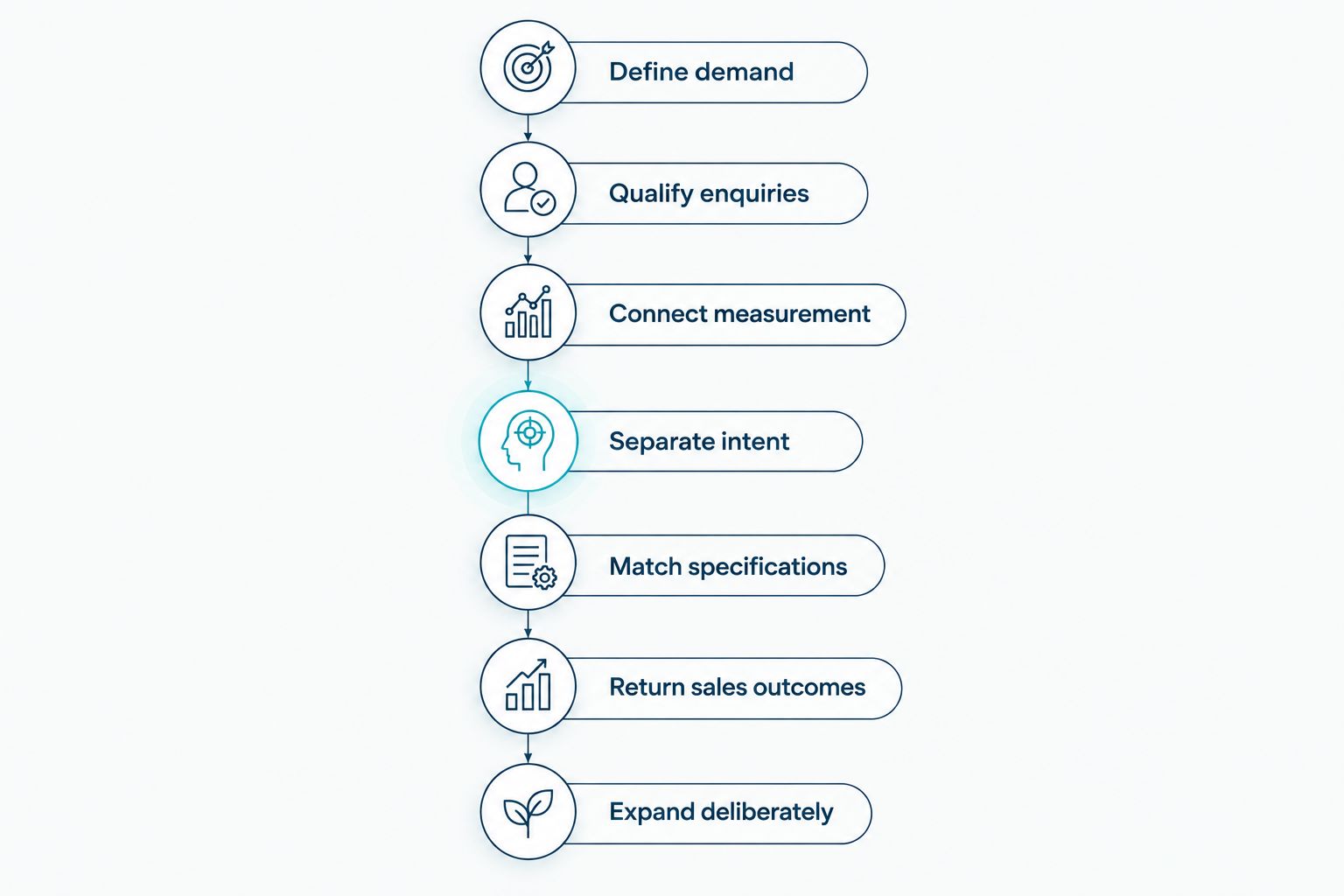
The sequence matters: define the demand, establish qualification, connect measurement, then expand. A tracking fix cannot compensate for an offer aimed at the wrong buyer.
Compare campaign management options
Choose who owns the work based on account complexity, internal technical knowledge and access to sales outcomes. External support does not remove the manufacturer's responsibility for defining suitable work. Every option needs someone who understands your capabilities and can reject unsuitable demand.
| Option | Best for | Main advantage | Key limitation |
|---|---|---|---|
| Manufacturer-led manual management | A tightly scoped campaign with an accountable internal owner | Direct access to technical and sales knowledge | Account review competes with the owner's other responsibilities |
| Dedicated in-house paid search specialist | Businesses needing ongoing account ownership within the team | Close connection to internal decisions and records | Requires paid search expertise as well as manufacturing input |
| Digital Womble Ltd Google Ads consulting | Businesses seeking diagnosis across paid search, SEO and AI search visibility | Brings the search disciplines into the same consulting scope | Still requires accurate capability information and sales feedback from your team |
| Split ownership | Manufacturers keeping technical qualification internal while seeking external campaign support | Separates account execution from specialist product judgement | Unclear responsibilities create gaps between reporting and sales |
For 2026, write down who owns keywords, tracking, landing-page accuracy and qualification feedback before choosing a management arrangement. Ask any provider how those responsibilities will be handled. A report of clicks and conversions is not an answer to the qualification problem.
Common mistakes B2B manufacturers make
Advertising capabilities you do not want to sell
A technically relevant enquiry can still be commercially unsuitable. Campaigns should reflect the work you want, not every process your equipment can perform. Review keywords against capacity priorities and the jobs your sales team declines.
Treating technical research as supplier selection
A search for a material property or process explanation does not establish buying intent. Keep educational demand distinct from supplier and RFQ demand. Inspect the actual search terms before deciding that a technical keyword deserves more spend.
Sending every buyer to the same page
A buyer seeking contract machining has a different requirement from someone seeking a stocked component. Match the destination to the offer. Do not ask a generic homepage to explain every capability equally well.
Reporting all submissions as successful leads
An employment enquiry and a suitable manufacturing RFQ are not equivalent outcomes. Preserve the distinction in your CRM and conversion reporting. Otherwise, optimisation rewards activity that your sales team does not value.
FAQ
What's the best way to start Google Ads for B2B manufacturers?
Start with one clearly defined manufacturing capability, a relevant landing page and an agreed qualified-enquiry definition. Connect enquiries to sales records before expanding targeting.
Should a manufacturer use exact match or broad match keywords?
Use focused targeting while establishing which searches generate qualified enquiries. Exact and phrase match still require search-term review; test broader matching against reliable downstream outcomes rather than form volume alone.
How much should a manufacturer spend on Google Ads?
Set the budget using your commercial limits and measured qualified-enquiry outcomes, not a generic manufacturing benchmark. Account for sales conversion, contribution from suitable work and the capacity available to fulfil it.
Is a brochure download a good Google Ads conversion?
A brochure download is an engagement action, not proof of a qualified manufacturing opportunity. Track it separately from RFQs unless your sales evidence establishes its value.
How do I stop consumer enquiries reaching a B2B manufacturing campaign?
Use business-focused ad wording, relevant landing pages and negative keywords based on unsuitable search intent. Review search terms alongside rejected enquiries so exclusions reflect actual problems.
Can Google Ads track quotations and completed manufacturing orders?
Google Ads supports importing downstream conversion outcomes when your tracking and sales systems can match them. Verify implementation requirements and data handling before using those outcomes for reporting or bidding.
Should I manage manufacturing Google Ads internally or use an agency?
Manage internally when you have accountable paid search expertise and access to sales feedback; use external support when you need campaign diagnosis or execution help. In either arrangement, keep technical qualification and capability accuracy under a named internal owner.
One last thing
Review your rejected enquiries before adding another keyword. They show where search intent, the advertised offer and manufacturing suitability diverge. Your next useful change could be an exclusion or a clearer capability statement, not a larger campaign.